FTP – File transfer protocol is used to transfer files from one host to another over TCP . Configuring ftp server on linux is safe and secure .
In this article we can see how to configure ftp server on centos 6 . please follow the steps.
Configuring ftp server on Centos 6:
Step 1 » Vsftpd is a lightweight FTP server package for Centos (linux) . Startinstalling package by issuing below command.
[root@leela ~]# yum -y install vsftpd
Step 2 » After installation, Open the file /etc/vsftpd/vsftpd.conf which is the config file for vsftpd ( I mean FTP server ) .Find the below line
Replace YES to NO to disable anonymous login ( Login without username and password ).
Uncomment the below line to disable chroot access ( optional )
Step 3 » Create a folder where you want to store FTP data. In my case i’m going to create in / ( root folder ) like below .[root@leela ~]# mkdir /ftpStep 4 » Now start creating users for accessing ftp server .
[root@leela ~]# useradd -d /ftp/krizna krizna
[root@leela ~]# passwd krizna
Changing password for user krizna.
New password:
You just created username krizna with home directory /ftp/krizna .
Step 5 » Start vsftpd service by issuing the below command.
[root@leela ~]# service vsftpd startand type this below command to start ftp server service automatically while booting.
[root@leela ~]# chkconfig --levels 235 vsftpd onStep 6 » That’s it, Now we can check the FTP access .Create some files in /ftp/krizna folder
[root@leela ~]# touch /ftp/krizna/test
[root@leela ~]# touch /ftp/krizna/test1
[root@leela ~]# touch /ftp/krizna/test2
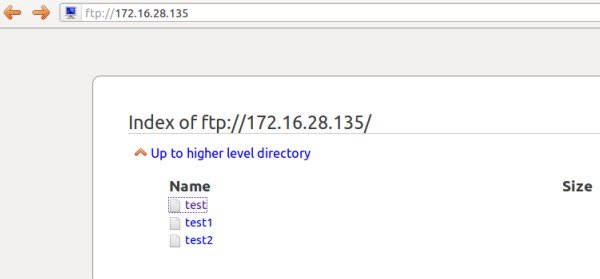
Now open ftp path in remote machine browser ftp://ftp-server-IP ( ftp://172.16.28.135 ). You can see the created files after authentication.
You can use Filezilla or winscp tools to upload/download files from FTP server.
Troubleshooting :
If you not able to connect ftp server , Disable the firewall ( iptables ) and selinux service on your ftp server .
Disable firewall ( Iptables ) »
[root@leela ~]# service iptables stop
[root@leela ~]# chkconfig iptables off
Disable Selinux » open the file /etc/selinux/config and find the line
SELINUX=enforcing
and replace with
SELINUX=disabled
now reboot the server and try again.